> ## Documentation Index
> Fetch the complete documentation index at: https://docs.pawa-ai.com/llms.txt
> Use this file to discover all available pages before exploring further.

# Tools Calling

> Give the model actions using function call. Define function call with structured arguments, to make Pawa AI models communicate with external systems and access data outside their training data.

<div className="rounded-2xl border border-neutral-800 bg-neutral-900 p-5 mb-6">
  <div className="inline-flex items-center gap-2 rounded-full bg-[#FFA200]/10 text-[#FFA200] px-3 py-1 text-xs font-semibold mb-3">
    <span>⚙️ Tools Calling</span>

    <span className="h-1 w-1 rounded-full bg-[#FFA200]" />
  </div>

  <p className="text-neutral-200 leading-relaxed">
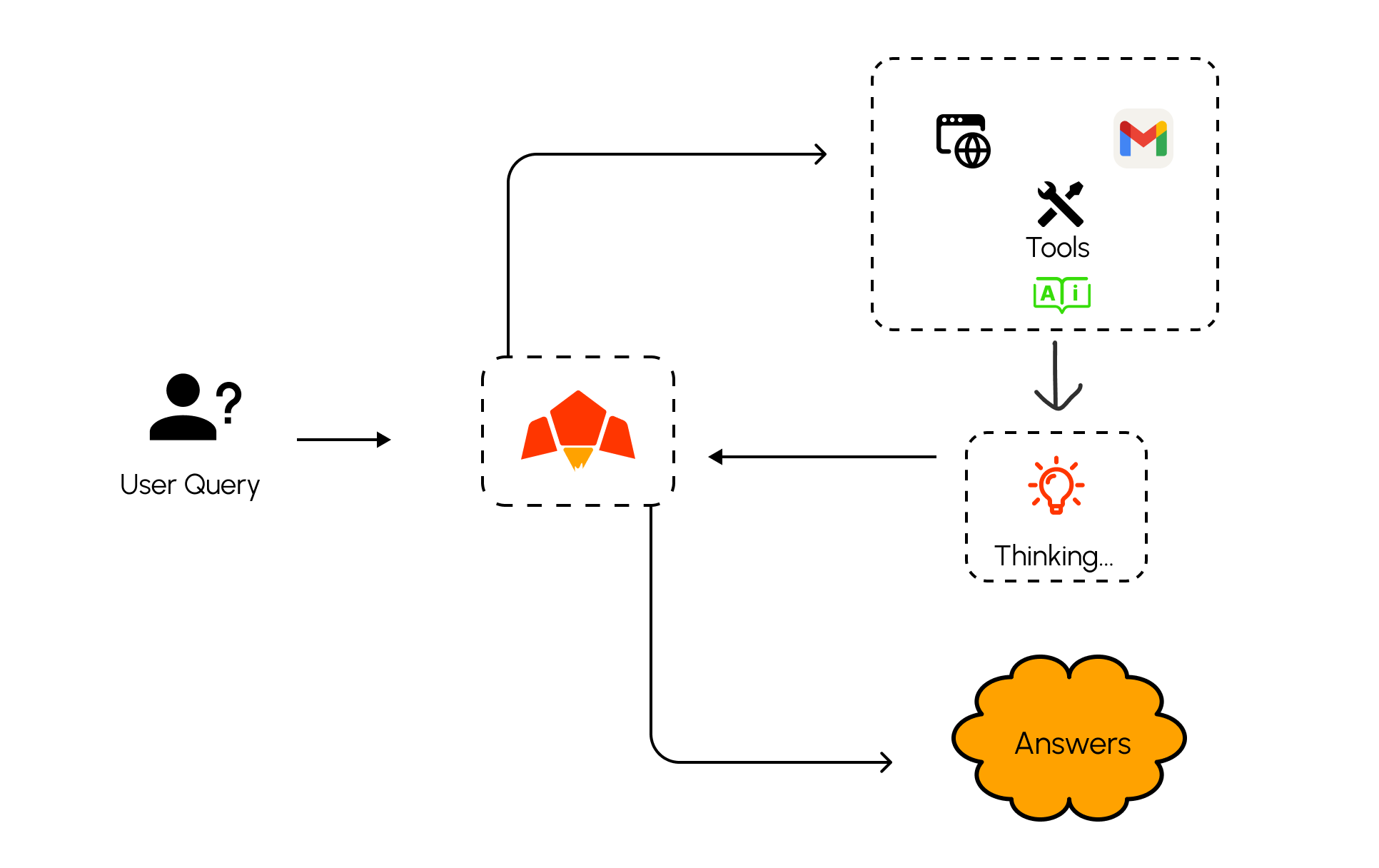
    Pawa AI Tools Calling lets you expose safe actions (functions/APIs) that the model can invoke with JSON arguments. Use it to search, query databases, fetch weather, run payments, or orchestrate internal services—while you stay in control of execution and access.
  </p>
</div>

> **Pawa AI Tool Calling Example**

<img src="https://mintcdn.com/sartifycoltd/h3QvoufTX15l3Mnz/images/Tools%20calling.png?fit=max&auto=format&n=h3QvoufTX15l3Mnz&q=85&s=f77cba55ec17d57d2f9b2a5f792e31e5" alt="Web Browsing Example" className=" w-full" width="1932" height="1216" data-path="images/Tools calling.png" />

### When to use Tools Calling

<ul className="space-y-2 my-3">
  <li className="flex items-start gap-3"><span className=" mt-0.5" /><span>You have deterministic operations the model should trigger (search, lookups, CRUD, RAG retrieval)</span></li>
  <li className="flex items-start gap-3"><span className="text-green-400 mt-0.5" /><span>You want grounded answers that incorporate real‑time data</span></li>
  <li className="flex items-start gap-3"><span className="text-green-400 mt-0.5" /><span>You need multi‑step workflows where the model plans, calls tools, and synthesizes results</span></li>
</ul>

### Example use cases

<div className="grid grid-cols-1 md:grid-cols-3 gap-4 my-3">
  <div className="rounded-xl border border-neutral-800 bg-neutral-900 p-4">
    <div className="text-lg">🌦️ <strong>Weather & Events</strong></div>
    <p className="text-neutral-300 text-sm mt-1">Get today's weather for a location, then craft user‑facing summaries.</p>
  </div>

  <div className="rounded-xl border border-neutral-800 bg-neutral-900 p-4">
    <div className="text-lg">🧾 <strong>Account Ops</strong></div>
    <p className="text-neutral-300 text-sm mt-1">Access account details by user ID and enforce role‑based checks.</p>
  </div>

  <div className="rounded-xl border border-neutral-800 bg-neutral-900 p-4">
    <div className="text-lg">↩️ <strong>Post‑order Actions</strong></div>
    <p className="text-neutral-300 text-sm mt-1">Issue refunds, re‑ship items, or create tickets after verification.</p>
  </div>
</div>

### Types of tools in Pawa AI

<ul className="space-y-2 my-3">
  <li className="flex items-start gap-3"><span className="text-[#FFA200] mt-0.5">◆</span><span><strong>Built‑in tools</strong> (<code>pawa\_tool</code>) such as <code>web\_search\_tool</code> and <code>pesa\_pay\_tool</code></span></li>
  <li className="flex items-start gap-3"><span className="text-[#FFA200] mt-0.5">◆</span><span><strong>Custom tools</strong> you define and pass in the chat request using JSON schema</span></li>
</ul>

### Tools Calling Models in Pawa AI.

Currently we have one tool calling model:

* **pawa-v1-blaze-20250318**: A powerful small language model (SLM) optimized for reasoning, complex generation, multimodal, tools understanding, agentic workflow, and advanced knowledge tasks.

#### Built‑in Tools

Pawa provides platform tools you can enable without hosting your own code. Include them in the <code>tools</code> array with type <code>pawa\_tool</code>.

```bash theme={null}
    curl https://api.pawa-ai.com/v1/chat/request \
      -H "Content-Type: application/json" \
      -H "Authorization: Bearer $PAWA_AI_API_KEY" \
      -d '{
        "model": "pawa-v1-blaze-20250318",
    "tools": [
      { "type": "pawa_tool", "name": "web_search_tool" },
      { "type": "pawa_tool", "name": "pesa_pay_tool" }
    ],
    "messages": [
      {
        "role": "user",
        "content": [
          {
            "type": "text",
            "text": "Find the latest news about Pawa AI and summarize it."
          }
        ]
      }
    ]
  }'
```

<Note>
  * Built‑in tools are executed by Pawa; you typically receive the final summarized answer without sending a second request.
  * Some tools may accept options; consult the tool’s reference for supported fields.
</Note>

#### Custom Tools

Custom tools are the tools you define on yourself and send through chat request. This normally has the following steps:

<ol className="list-decimal pl-6 space-y-2">
  <li>Define the tool in JSON schema</li>
  <li>Make a request to the model with the tools it can call</li>
  <li>Receive a tool call from the model</li>
  <li>Execute your code with the provided arguments</li>
  <li>Send a second request including the tool result</li>
  <li>Receive the final response (or additional tool calls)</li>
</ol>

#### Step‑by‑step example on custom tools.

<div className="grid grid-cols-1 md:grid-cols-1 gap-6">
  <div className="rounded-xl border border-neutral-800 bg-neutral-900 p-4">
    <div className="font-semibold mb-2">1) Define the tool</div>
    <p className="text-neutral-300 text-sm mb-3">Describe your function with JSON Schema. This shapes the arguments the model will produce.</p>

    ```json theme={null}
    {
      "type": "function",
      "function": {
        "name": "get_weather",
        "description": "Get current weather by city",
        "parameters": {
          "type": "object",
          "properties": {
            "city": {"type": "string"},
            "unit": {"type": "string", "enum": ["celsius","fahrenheit"], "default": "celsius"}
          },
          "required": ["city"],
          "additionalProperties": false
        }
      }
    }
    ```

    Each tool entry follows a consistent shape. The <code>function</code> object uses JSON Schema to precisely describe the arguments you expect.

    **type**: Must be `function` for custom tools.
    **function.name**: Short, unique identifier the model will reference in `tool_calls`.
    **strict**
    **function.description**: One sentence describing when to use the tool; critical for good tool selection.
    **function.parameters.type**: Usually `object` (a set of named arguments).
    **properties**: Map of argument names to schemas. Use `type`, `description`, and constraints (`enum`, `minimum`, `maxLength`, etc.).
    **required**: Array of argument names that must be present.
    **tool\_choice**
    **additionalProperties**: Set to `false` to prevent unexpected fields.
    Optional fields like **default**, **examples**, and **format** help the model produce better arguments.
  </div>

  <div className="rounded-xl border border-neutral-800 bg-neutral-900 p-4">
    <div className="font-semibold mb-2">2) Send initial request</div>
    <p className="text-neutral-300 text-sm mb-3">Provide the tool definition and a user question. The model decides whether to call the tool.</p>

    ```bash theme={null}
        curl https://api.pawa-ai.com/v1/chat/request \
          -H "Content-Type: application/json" \
          -H "Authorization: Bearer $PAWA_AI_API_KEY" \
          -d '{
            "model": "pawa-v1-blaze-20250318",
        "tools": [{ "type": "function", "function": { "name": "get_weather", "parameters": { "type": "object", "properties": { "city": {"type":"string"} } , "required": ["city"] } } }],
        "messages": [
          {
            "role": "user",
            "content": [
              {
                "type": "text",
                "text": "What is the weather in Dar es Salaam?"
              }
            ]
          }
        ]
      }'
    ```
  </div>

  <div className="rounded-xl border border-neutral-800 bg-neutral-900 p-4">
    <div className="font-semibold mb-2">3) Receive tool call</div>
    <p className="text-neutral-300 text-sm mb-3">The assistant replies with <code>tool\_calls</code> including the tool name and arguments.</p>

    ```json theme={null}
    {
      "success": true,
      "message": "Chat request processed successfully",
      "data": {
        "request": [
          {
            "finish_reason": "tool_calls",
            "message": {
              "role": "assistant",
              "content": "In this request, the model has made a tool call, extract the tool call from the response, process it accordingly and return the result",
      "tool_calls": [
        { "id": "call_01", "type": "function", "function": { "name": "get_weather", "arguments": { "city": "Dar es Salaam", "unit": "celsius" } } }
      ]
            }
          }
        ],
        "created": "2025-09-25",
        "model": "pawa-v1-blaze-20250318",
        "object": "chat.request"
      }
    }
    ```
  </div>

  <div className="rounded-xl border border-neutral-800 bg-neutral-900 p-4">
    <div className="font-semibold mb-2">4) Execute your code</div>
    <p className="text-neutral-300 text-sm mb-3">Your backend runs the function safely and prepares a compact JSON result.</p>

    ```javascript theme={null}
    async function getWeather({ city, unit = "celsius" }) {
      // Replace with a real API
      return { city, unit, temp_c: 28, condition: "Sunny" };
    }
    ```
  </div>

  <div className="rounded-xl border border-neutral-800 bg-neutral-900 p-4">
    <div className="font-semibold mb-2">5) Send tool result back</div>
    <p className="text-neutral-300 text-sm mb-3">Post a follow‑up message with role <code>tool</code>, the tool <code>name</code>, and the JSON output.</p>

    ```bash theme={null}
        curl https://api.pawa-ai.com/v1/chat/request \
          -H "Content-Type: application/json" \
          -H "Authorization: Bearer $PAWA_AI_API_KEY" \
          -d '{
            "model": "pawa-v1-blaze-20250318",
        "messages": [
          {"role":"user","content":"What is the weather in Dar es Salaam?"},
              {
                            "role": "system",
                            "name": get_weather,
                            "content": [
                                {"type": "text", "text": str({\"city\":\"Dar es Salaam\",\"unit\":\"celsius\",\"temp_c\":28,\"condition\":\"Sunny\"})},
                                {
                                    "type": "text",
                                    "text": "Now the tool has helped you got the above answers required by user. Explain this back to the user as it is",
                                }
                            ],
                        }
        ]
      }'
    ```
  </div>

  <div className="rounded-xl border border-neutral-800 bg-neutral-900 p-4">
    <div className="font-semibold mb-2">6) Receive final answer</div>
    <p className="text-neutral-300 text-sm mb-3">The model grounds its response on the tool output. It may request more tools if needed.</p>

    ```json theme={null}
    {
      "role": "assistant",
      "content": "In Dar es Salaam it is Sunny at around 28°C."
    }
    ```
  </div>
</div>

### Best practices for authoring schemas

<ul className="space-y-2 my-3">
  <li>Use clear, action‑oriented names (e.g., <code>get\_weather</code>, <code>refund\_order</code>)</li>
  <li>Write concise descriptions that specify when to use the tool and what it returns.</li>
  <li>Constrain arguments with <code>enum</code>, ranges, and <code>additionalProperties: false</code> to reduce errors.</li>
  <li>Prefer simple primitives (string/number/boolean) over deeply nested shapes unless required.</li>
  <li>Return compact JSON from your tool for the model to reason over; avoid verbose prose.</li>
</ul>

### Multiple tools in one request

You can provide several tools at the same time (custom and built‑in). The model may call one or more in sequence, or even in parallel.

```bash theme={null}
   curl https://api.pawa-ai.com/v1/chat/request \
      -H "Content-Type: application/json" \
      -H "Authorization: Bearer $PAWA_AI_API_KEY" \
      -d '{
        "model": "pawa-v1-blaze-20250318",
    "tools": [
      { "type": "function", "function": { "name": "get_weather", "parameters": { "type": "object", "properties": { "city": {"type":"string"} }, "required": ["city"] } } },
      { "type": "function", "function": { "name": "get_events", "parameters": { "type": "object", "properties": { "city": {"type":"string"}, "date": {"type":"string", "format": "date"} }, "required": ["city"] } } },
      { "type": "pawa_tool", "name": "web_search_tool" }
    ],
    "messages": [
      {
        "role": "user",
        "content": [
          {
            "type": "text",
            "text": "I am in Dar es Salaam tomorrow. What should I prepare for?"
          }
        ]
      }
    ]
  }'
```

Example tool\_calls (parallel):

```json theme={null}
{
  "success": true,
  "message": "Chat request processed successfully",
  "data": {
    "request": [
      {
        "finish_reason": "tool_calls",
        "message": {
          "role": "assistant",
          "content": "In this request, the model has made a tool call, extract the tool call from the response, process it accordingly and return the result",
   "tool_calls": [
    { "id": "call_weather", "type": "function", "function": { "name": "get_weather", "arguments": { "city": "Dar es Salaam" } } },
    { "id": "call_events", "type": "function", "function": { "name": "get_events", "arguments": { "city": "Dar es Salaam", "date": "2025-09-12" } } }
  ]
        }
      }
    ],
    "created": "2025-09-25",
    "model": "pawa-v1-blaze-20250318",
    "object": "chat.request"
  }
}

```

Handle both calls concurrently in your backend, then post two `tool` messages with the results. The final model message will synthesize both.

> With Pawa AI tool calling, you get the most powerful up to date techninique to build advanced agentic AI bot that solves complex problems by using and integrating with the external sources or systems.
